
Use this report to assess the prevalence of maintenance issues across the entire fleet and to identify vehicles with an unusually high number of issues. This report displays the number issues for the date range that the filter pane specifies.
The KPIs at the top indicate the number of issues for the entire fleet. The types of issues include Driver Vehicle Inspection Report (DVIR) issues, Intelligent Transportation Systems (ITS) issues, and Vehicle Health Monitoring (VHM) issues. The color-coded bar chart indicates the number of issues by type.
The numbers to the left of the bars are vehicle numbers.
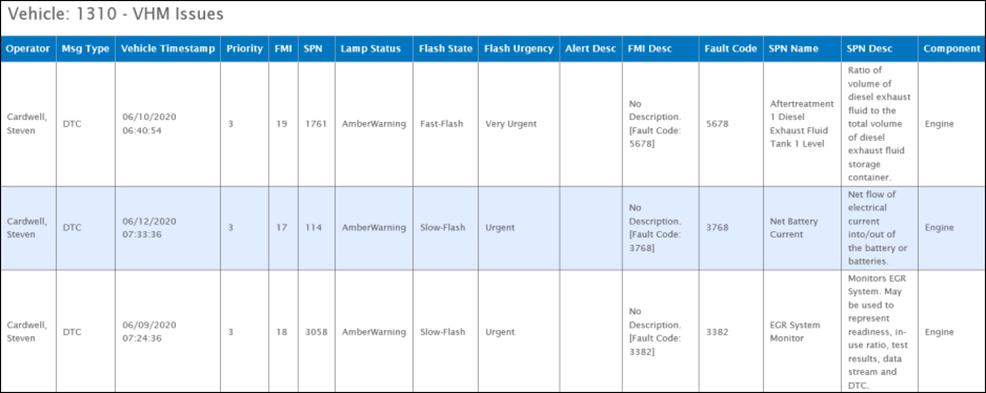
Click a column heading to sort the table by that column. Multiple clicks toggle between ascending and descending sort orders. For example, click the Flash Urgency heading to sort the table by urgency.
On the Vehicle Issues report, each bar represents a vehicle. Click a bar to see the issues for a vehicle in more detail, as shown below.
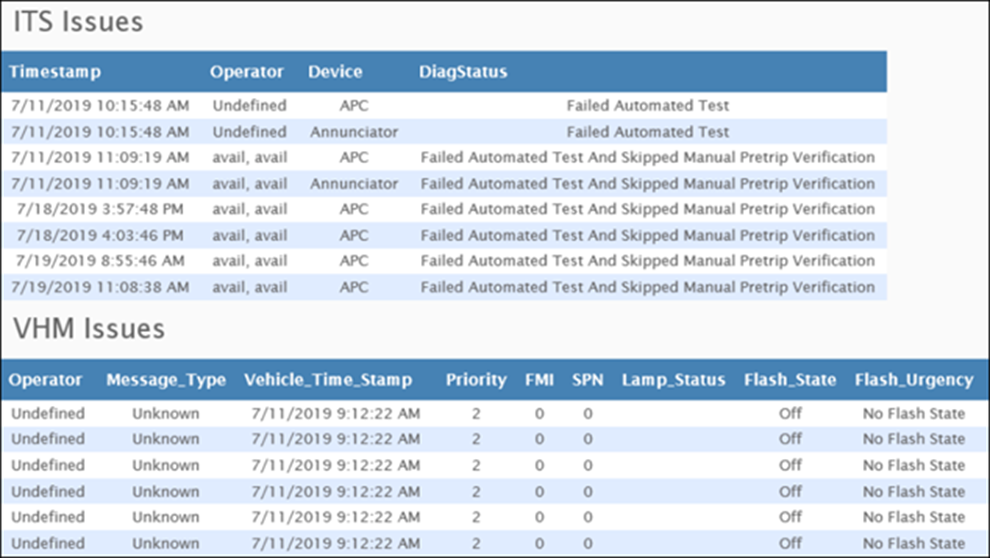
Vehicle boot-up diagnostic results are included in the ITS Issues sub-report. The Diagnostic Status column displays issues such as “Device Not Found”, “Cannot Communicate With Device”, and “Failed Automated Test and Manual Pretrip Verification Pending.” These results are also reflected in the total number of failures shown in the main report.
Filter
A user can filter data by a Specific Date or a Sliding date, as well as Issue Type and Vehicle.
Available Issue Types are DVIR, ITS, and VHM. The user can select one, two, or all three types at a time and the chart will show only those issues.
When filtering by Vehicle, the report no longer defaults to the Top 20 Vehicles. The vehicle filter now only contains vehicles with issues within the selected date range, and only vehicles with an issue of the type selected in the Issue Type filter.
Clicking Select All will select all vehicles in the dropdown. If the user selects only a vehicle and no Issue Types, the chart will show all issue types for that vehicle.
Sort By: Change the sort order to focus on a particular type of vehicle issue. The graph displays vehicles in descending order by the following characteristics.
- Total Failures: The total number of DVIR + ITS + VHM failures (Default)
- Pre-Trip Failures: The number of pre-trip inspection failures
- ITS Failures: The number of ITS failures
- VHM Failures: The number of vehicle health monitoring (VHM)